
PRÉSET Complete Kit
€115,99€153,97
Nothing here yet.
Add a product to your cart to continue.

PASTEL is part of the PRÉSET Studio pack. It introduces a soft, diffused light that wraps objects in a gentle haze, creating an atmosphere that feels calm and understated. Subtle tones and a muted backdrop highlight details without overpowering them, offering a clean and airy foundation for any composition.
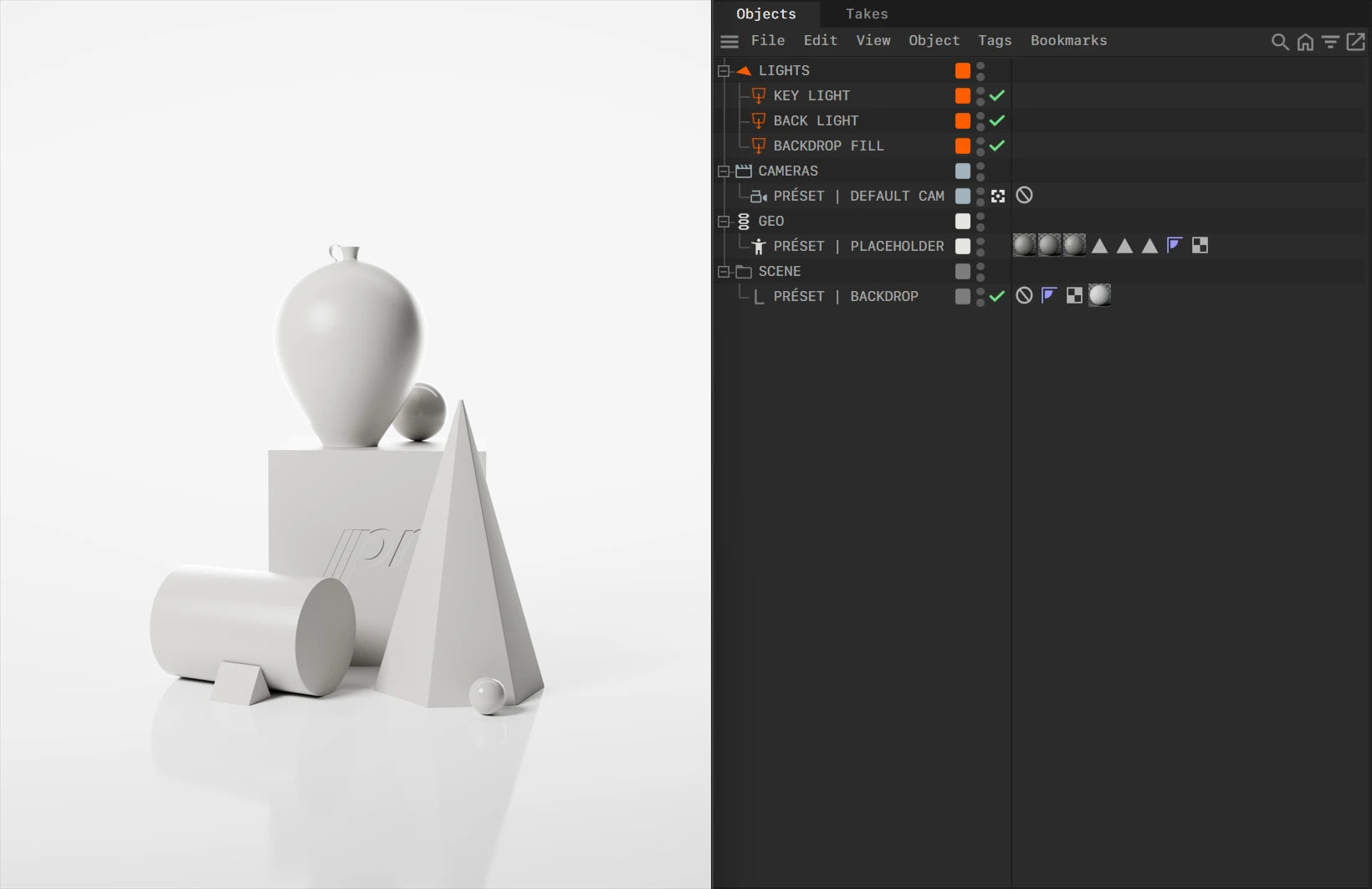
The scene uses a carefully placed key light and a delicate back light to frame the subject, supported by a backdrop fill that interacts with a finely tuned volumetric environment. The result is a faint, atmospheric glow that adds depth and character while keeping the overall mood light and refined.
Digital copy, accessible immediately after purchase.
The PRÉSET scenes are organized into a clear and structured hierarchy to streamline your workflow and ensure easy customization. Below is a breakdown of the scene structure:
- LIGHTS: The Lights section contains all the lighting setups necessary for each scene. The number and type of lights may vary depending on the scene's design. Each light is descriptively named (e.g., KEY LIGHT, BACK LIGHT, BACKDROP FILL) to indicate its purpose and position within the scene. These lights are pre-configured but can be adjusted to meet the specific requirements of your project.
- CAMERAS: The PRÉSET | DEFAULT CAM is the primary camera included in each scene. It is equipped with a Protection Tag to prevent accidental movement. This tag can be temporarily disabled for customization.
- GEO: This group contains PRÉSET | PLACEHOLDER geometry that is used as a reference for scale and placement. This placeholder can be deleted before you import your own object(s) into the scene.
- SCENE: The PRÉSET | BACKDROP object provides the background for the scene. It includes a customizable backdrop element that can be repositioned or resized to fit your project's needs.
Trusted by 1.000+ 3D artists & studios worldwide
 Weronika Blitek Studio
 I'm very happy with the productI'm very happy with the product and customer support. The preset kit really streamlines the early stages of my workflow and saves a lot of time. Definitely worth the investment!
Poland
September 11, 2025
I'm very happy with the productI'm very happy with the product and customer support. The preset kit really streamlines the early stages of my workflow and saves a lot of time. Definitely worth the investment!
Poland
September 11, 2025
 Jayme H FlorentinoReally great setsReally great sets! Simple and clean!
United States
August 31, 2025
Jayme H FlorentinoReally great setsReally great sets! Simple and clean!
United States
August 31, 2025
 YUNGBLD StudioExcited for more!I've made some really beautiful renderings with this pack, so thank you for making and selling them! Hope to see you doing more stuff in the future!!
United States
February 12, 2025
YUNGBLD StudioExcited for more!I've made some really beautiful renderings with this pack, so thank you for making and selling them! Hope to see you doing more stuff in the future!!
United States
February 12, 2025
 Liberatto RodriguezProduct and customer service 10/10The product itself is great, but the customer service was just as good. I'm impressed. I ran into some problems trying to get some of the assets to work properly, so I tried contacting them directly. They immediately responded and figured out what was causing the issue. What a feeling to have this now in my kit and knowing they have my back if any other problems come up.
Spain
February 3, 2025
Liberatto RodriguezProduct and customer service 10/10The product itself is great, but the customer service was just as good. I'm impressed. I ran into some problems trying to get some of the assets to work properly, so I tried contacting them directly. They immediately responded and figured out what was causing the issue. What a feeling to have this now in my kit and knowing they have my back if any other problems come up.
Spain
February 3, 2025
 David NinuBest Blender presetsBest Blender presets; easy to use and great outcome
Romania
September 19, 2025
David NinuBest Blender presetsBest Blender presets; easy to use and great outcome
Romania
September 19, 2025
 Nathan MartellTop quality product and supportPRÉSET is a unique and incredibly well considered product. Communication both pre and post sale has been fantastic. Fully recommend!
Canada
October 31, 2024
Nathan MartellTop quality product and supportPRÉSET is a unique and incredibly well considered product. Communication both pre and post sale has been fantastic. Fully recommend!
Canada
October 31, 2024
 Blank Space StudioAmazing Blender Presets! Looking forward to more!I purchased your presets for blender and they're amazing!! If you ever launch any other resources let me know!
Spain
October 24, 2024
Blank Space StudioAmazing Blender Presets! Looking forward to more!I purchased your presets for blender and they're amazing!! If you ever launch any other resources let me know!
Spain
October 24, 2024
 Zach KendallA really comprehensive productI lacked some understanding on the start up file and have received clear and quick response from their team. 10/10
Australia
October 18, 2024
Zach KendallA really comprehensive productI lacked some understanding on the start up file and have received clear and quick response from their team. 10/10
Australia
October 18, 2024
 Tunay BoraWell built presets. Happy to support!I just started playing around with the presets, and they are built incredibly well.
Switzerland
August 28, 2024
Tunay BoraWell built presets. Happy to support!I just started playing around with the presets, and they are built incredibly well.
Switzerland
August 28, 2024
 Nate BalliEasy to use. Great for previz work!Just bought it to mess around with some product previz work for some life action. You guys have done an incredible job making it easy for someone like me who doesn't have the most experience in C4D.
United States
August 27, 2024
Nate BalliEasy to use. Great for previz work!Just bought it to mess around with some product previz work for some life action. You guys have done an incredible job making it easy for someone like me who doesn't have the most experience in C4D.
United States
August 27, 2024
 Raminder SinghVery smooth procedureVery smooth procedure, very professional. Everything was easy to find, which goes onto show how they crafted it towards customers having smooth experience.
Canada
August 13, 2024
Raminder SinghVery smooth procedureVery smooth procedure, very professional. Everything was easy to find, which goes onto show how they crafted it towards customers having smooth experience.
Canada
August 13, 2024


